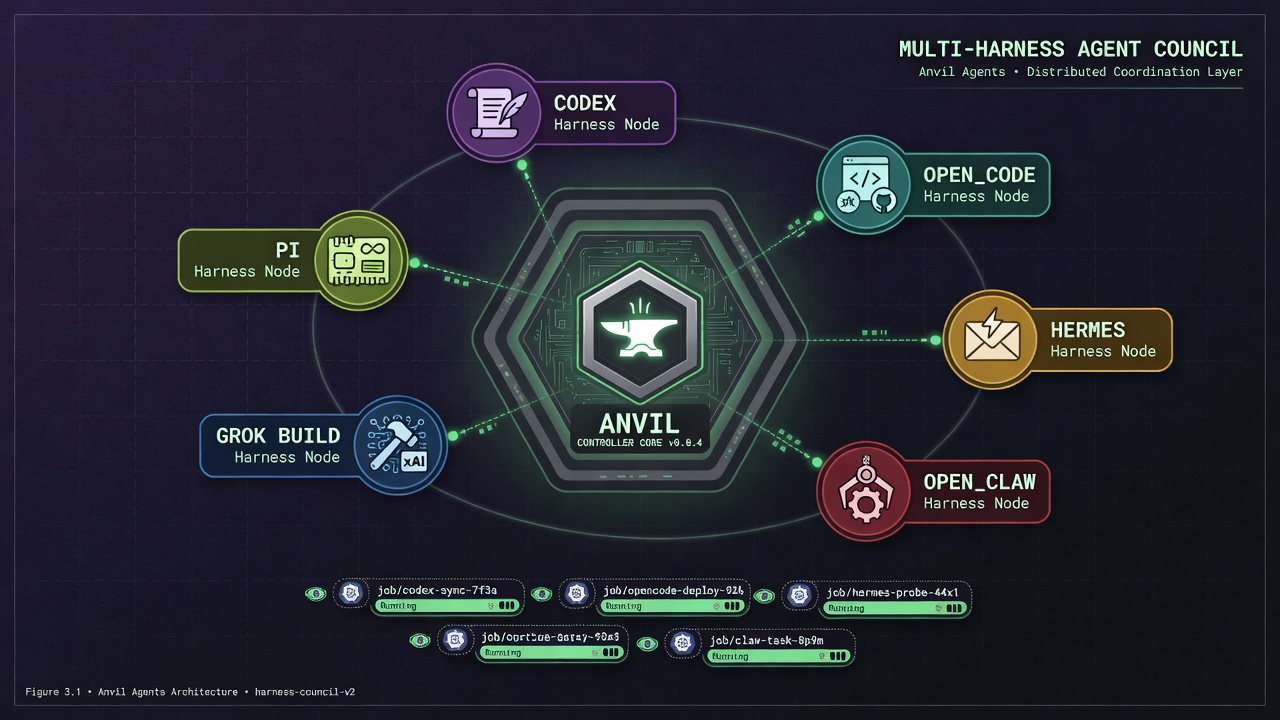
Harnesses
One AgentRun creates one Job and selects one harness. Install-wide
runnerImages values provide defaults; the source chart uses local :dev
names and a packaged chart uses its matching vVERSION. An
AgentHarnessProfile selects the adapter, image, provider configuration,
workload identity, credentials, storage, and resource envelope. A run can
atomically select a different harness profile and can apply explicit inline
runtime overrides. Production installations should use image digests.
| Kind | Runtime | Provider fields | Durable home recommended |
|---|---|---|---|
codex | OpenAI Codex CLI | Codex model, reasoning, approval settings | yes |
openCode | OpenCode CLI | provider-qualified model, agent, variant, auto/pure mode | yes |
hermesAgent | Hermes Agent | provider, auth mode, model | yes |
openClaw | OpenClaw | provider, agent ID, model, thinking | yes |
grokBuild | Grok Build | xAI model, profile, service tier | yes |
piAgent | Pi coding agent | provider, model, thinking, mode | yes |
custom | operator-supplied image | command and args | image-defined |
The shared model-provider enum currently covers OpenAI/Codex and xAI
integrations. OpenCode keeps its broader provider catalog native by accepting
a provider-qualified openCode.model value and provider credential environment
variables rather than narrowing it to that enum.
Remote issue context and remote skill files are currently GitHub adapters. They
are optional integration surfaces, not requirements for custom harnesses.
Common Contract
Every built-in runner receives:
ANVIL_AGENT_RUN_PROMPT_FILE: complete generated prompt.ANVIL_AGENT_RUN_CONTEXT_FILE: structured run and source context.ANVIL_AGENT_RUN_TOOL_SETUP_FILES: newline-separated executable setup files.ANVIL_AGENT_RUN_TOOLS_JSON: names, descriptions, setup paths, and checks.ANVIL_AGENT_RUN_STATUS_LOG_PREFIX: prefix for JSON status log records.- provider and backend-specific environment variables.
Setup scripts run after repository preparation and before the runtime starts.
They execute as the container user in the configured workdir. Keep them
idempotent, install only into writable paths, pin downloaded artifacts, and
pass credentials through the selected harness profile's envSecretRefs rather
than inline YAML. Tool contracts normally live in AgentToolSet; the skill
that teaches an agent when to use them remains in AgentSkillSet. Selecting a
tool set does not grant the credentials that its tool may need.
Run profiles created before the composition API may still contain inline
backend and execution settings. When a run selects a different
harnessProfileRef, those profile-inline runtime fields are deliberately not
carried into the replacement. Move all provider credentials and durable homes
into AgentHarnessProfile before offering runtime swaps. See
Agent Composition.
OpenCode On Kubernetes
The built-in OpenCode image pins the upstream standalone binary and verifies
its release checksum at build time. It uses the supported non-interactive
opencode run command, pipes the combined AgentRun prompt on stdin, defaults
to JSON event logs, disables auto-updates, and uses --pure unless the backend
explicitly opts out. See the
OpenCode CLI documentation and the image
README.
Select a provider-qualified model such as openai/gpt-5.4. Supply provider API
keys through envSecretRefs, or seed an existing credential store with
OPENCODE_AUTH_JSON. OpenCode's standard auth file lives below the runner's
XDG data directory and is included in the /opt/anvil/opencode durable-home
layout. Do not start interactive login inside an AgentRun Job.
openCode.auto: true enables OpenCode's explicit auto-approval mode for
permission requests not denied by configuration. It is intentionally false by
default. OpenCode's own permission rules and the Pod's ServiceAccount, Secret,
mount, egress, and security boundaries must agree with the run intent.
Workload Sizing And Placement
Harness profiles are also reusable machine profiles for heavy work. Set CPU,
memory, and ephemeral-storage requests so Kubernetes can place builds, test
suites, indexing, and analysis on a node that can complete them. Use limits to
bound one run, and use nodeSelector, affinity, and tolerations to route
specialized harnesses to dedicated pools.
Keep distinct profiles for materially different envelopes, such as a small review lane, a large Rust build lane, and a custom GPU analysis lane. They can all be selected by the same provider-neutral run profile and skill sets. This avoids hard-coding one machine class into the agent's role.
Each harness Pod occupies one node. Run multiple independent AgentRuns to use
multiple machines; a single run is not split across nodes by the controller.
Local or ReadWriteOnce data volumes may constrain placement and parallel
mounts. See Distributed Workloads before sharing a
durable home across concurrent lanes.
Codex Sandbox On Kubernetes
Codex read-only and workspace-write sandbox modes depend on unprivileged
user namespaces and their OS sandbox helper. Hardened Kubernetes nodes often
disable that kernel capability, which causes the CLI to fail before the model
run starts. Test the selected mode on every worker pool used by the harness.
When those nodes cannot support the inner Codex sandbox, the
danger-full-access Codex mode can run inside a deliberately hardened Pod. In
that configuration the name applies to the process inside its container; it
does not grant Kubernetes or node authority by itself. The Pod boundary must
carry the security policy: non-root user, dropped capabilities, seccomp,
read-only root filesystem where supported, narrow ServiceAccount/RBAC, bounded
mounts and Secrets, controlled egress, namespace isolation, and immutable
images. Do not use this fallback as a substitute for those controls.
Custom Harness
A custom image should read the prompt and context files, perform one bounded
task, print useful logs, exit nonzero on failure, and emit status JSON. The
small image under examples/quickstart is the executable reference contract.
A status line looks like:
ANVIL_AGENT_RUN_STATUS_JSON={"type":"decision","action":"inspect","summary":"completed","residualRisk":"none"}
The controller also treats Kubernetes Job success or failure as terminal evidence. Structured reports enrich status; they do not override a failed Job.
Source Preparation
The built-in images honor their documented repository environment variables,
but v0.1 does not have a provider-neutral repository source object. Supply
repository URL/ref variables through a profile or Secret, or build source
preparation into a custom image. Do not assume that applicationRef clones a
repository; it is only scope metadata. When a built-in image is asked to clone
or check out a repository, clone, fetch, and ref-resolution failures terminate
the Job instead of silently running against an empty or wrong workspace.
Use credential helpers or provider-specific token Secrets where possible. If an HTTP(S) repository URL contains userinfo, a query, or a fragment, the runner uses it only for transport and persists a sanitized origin URL. Credential- bearing URLs using other URI schemes are rejected; use a normal SSH username or credential helper instead. This prevents a durable workspace from retaining the inline credential, but it does not make inline URL credentials the preferred authentication mechanism.
Remote skill content is a separate controller-side fetch. Its source must name
a full immutable commit. Private-source tokens are mapped by exact API host in
the trusted harness execution envelope; they cannot be selected by an
AgentSkillSet or skill override.