Getting Started
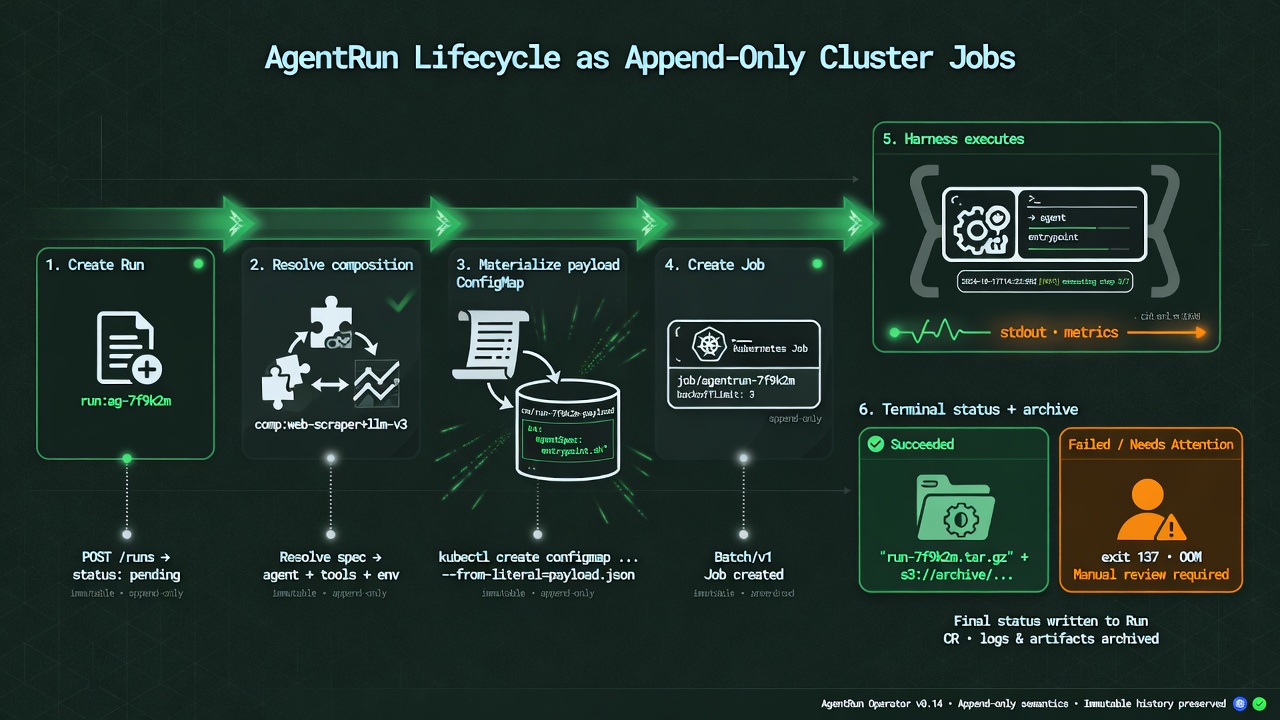
The quickest reliable test is the credential-free Kind example. It proves the controller, CRDs, PVC-backed state, Job creation, mounted payload, custom harness, logs, and structured terminal status before a model provider is introduced.
Prerequisites
- Linux amd64 for the currently validated image set
- Kubernetes 1.30 or newer
- Helm 3.14 or newer
- Docker with BuildKit
kubectlripgrep(rg) for the fullmake kind-e2eretention check- Kind for the local path
- Go 1.25 only when building the controller from source
The current release gate does not yet certify older Kubernetes versions or published arm64 images.
These are the broader source-build requirements. Judges using the public
no-build path can install only its certified user-space tools without sudo:
./hack/install-judge-prerequisites.sh --install \
  --bin-dir "${HOME}/.local/bin"
export PATH="${HOME}/.local/bin:${PATH}"
./hack/install-judge-prerequisites.sh --check
That script installs checksum-pinned Kind, kubectl, and Helm binaries. It checks but never installs or reconfigures the host's Docker Engine. Continue with the digest-pinned public Kind test.
Credential-Free Kind Run
Install Kind, then run:
./examples/quickstart/run.sh
The source chart deliberately names local :dev images so the quickstart tests
the checkout being inspected. The script creates or reuses a cluster named
anvil-agents, builds
anvil-agents:dev and anvil-agents-demo:dev, loads both images, installs the
local chart, applies the example, and waits for AgentRun/demo-001 to report
Ready. It also binds a small AgentDataVolume. Every Helm and kubectl operation
is pinned to kind-anvil-agents (or the selected
ANVIL_AGENTS_KIND_CLUSTER) rather than the ambient context. It leaves the
cluster available for inspection.
make kind-e2e first uses a disposable cluster to upgrade a portable seven-CRD
legacy-object baseline to the twelve-CRD composition and signal API without losing
existing objects. It then runs the current execution, validates every sample with
server-side dry-run, uninstalls the chart, proves all twelve CRDs plus the run,
profiles, skill set, tool set, data volume, and PVC were retained, and reinstalls the
controller. A second run then executes through the retained composition and
storage objects. The quickstart also asserts the resolved harness, skill-set,
and tool-set refs, data-volume claim, and both composition digests.
kubectl --context kind-anvil-agents get agentrun -n agents-quickstart demo-001 -o yaml
kubectl --context kind-anvil-agents logs -n agents-quickstart \
  -l control.anvil.hazyforge.io/agent-run=demo-001
kind delete cluster --name anvil-agents
Existing Cluster
The public v0.1.1 chart and six Linux amd64 images are available from GHCR:
helm upgrade --install anvil-agents \
  oci://ghcr.io/hazyforge/charts/anvil-agents \
  --version 0.1.1 \
  --namespace anvil-agents-system \
  --create-namespace \
  --wait
The matching immutable references are recorded in the
v0.1.1 image lock.
Copy those digest references into production values before enabling real
harnesses. The release page
also carries the packaged chart for offline transfer.
Build Or Mirror From Source
For a source checkout, build and push all images to a registry reachable by the cluster:
./hack/build-images.sh \
  --prefix registry.example.com/platform \
  --tag v0.1.1 \
  --push
Package the version-coupled chart locally when distributing a release bundle:
./hack/package-chart.sh \
  --version 0.1.1 \
  --output dist \
  --image-prefix registry.example.com/platform
Create a values file that sets image.reference and all six runnerImages.
Prefer digest references. Install the chart:
helm upgrade --install anvil-agents charts/anvil-agents \
  --namespace anvil-agents-system \
  --create-namespace \
  --values production-values.yaml \
  --wait
To publish a complete release or mirror without GitHub Actions, log Docker and
Helm into the registry, check out a clean vX.Y.Z tag, and run:
./hack/publish-release.sh \
  --prefix registry.example.com/platform \
  --version vX.Y.Z
The script first runs make verify and the disposable Kind upgrade/install
suite, then publishes and verifies all seven images, writes
dist/images-vX.Y.Z.lock.tsv, packages the chart, and pushes it to
oci://registry.example.com/platform/charts. Use --chart-registry to select
another OCI chart namespace. --skip-verification is an explicit escape hatch
only when equivalent checks already ran for that exact tag. The optional GitHub
workflow uses the same repository-owned contracts; it is a convenience, not a
release prerequisite. Published release charts use the generated image lock,
so all seven default image references are pinned by digest. For an offline manual
package, pass that same file to package-chart.sh --image-lock together with
--source-revision "$(git rev-parse 'vX.Y.Z^{commit}')". The package command
rejects lock metadata that does not match the expected version-tag commit.
Anvil Primaris first-party cutovers
For the Hazy Forge Primaris overlay (digest pins + CRD install + optional live Helm apply), prefer the local Docker path in Release to Primaris:
# Console/controller iteration → build, pin, helm deploy (no Actions, no Kind):
make release-primaris-hot

# Versioned release, pin Primaris deploy.yaml (commit for Argo):
VERSION=v0.1.14 make release-primaris-fast

# Apply current pins + CRDs from the local chart:
make deploy-primaris
Add A Real Harness
- Create a dedicated agent namespace.
- Create a runner ServiceAccount with only the APIs the task needs.
- Create one provider credential Secret in that namespace.
- Create an
AgentHarnessProfileselecting the adapter, digest-pinned image, ServiceAccount, provider Secret, timeout, and resource limits. - Create any backend-neutral
AgentSkillSetinstruction packs andAgentToolSetexternal tool contracts. - Create an
AgentRunProfilethat composes the role, harness, skills, and tools. - Create a run with a non-empty
sourceRef.kindandsourceRef.name. - Observe status and logs, then enable schedules only after the manual path is bounded and repeatable.
The manifests under examples/multi-harness are an illustrative next step.
Provider Secret key names and authentication semantics belong to the selected
harness; review Harnesses and its image documentation.
Scale Across Workers
- Make the selected runner images pullable by every eligible worker node.
- Give each harness profile realistic CPU, memory, and ephemeral-storage requests plus placement compatible with its intended node pool.
- Create at least two independent runs, or use
AgentSchedulewithAllowand an explicit concurrency cap above one. - When runs share an application key, have a cluster administrator raise the
cluster-scoped
AgentRunControlcap, or raise the HelmapplicationMaxConcurrentRunsfallback from its default of one. The lowest positive value across matching controls wins. - Confirm placement with
kubectl get pods -n <namespace> -o wide, then add worker capacity or configure cluster autoscaling as demand grows.
Each run stays on one node, but many runs can consume different machines at the
same time. Restrictive affinity, unavailable image architectures, namespace
quota, and local or shared ReadWriteOnce volumes can leave Jobs Pending or
serialize them. See Distributed Workloads before
enabling high concurrency.
Before Production
Read Security. Run, profile, harness-profile, and skill-set writers can cause executable code to run; harness profiles additionally select same-namespace identities, credentials, storage, and placement. Use dedicated trust domains, admission policy, resource quotas, network policy, immutable images, backups, and deliberate retention. Enable the OIDC API only after configuring a dedicated resource audience and explicit namespace bindings.